
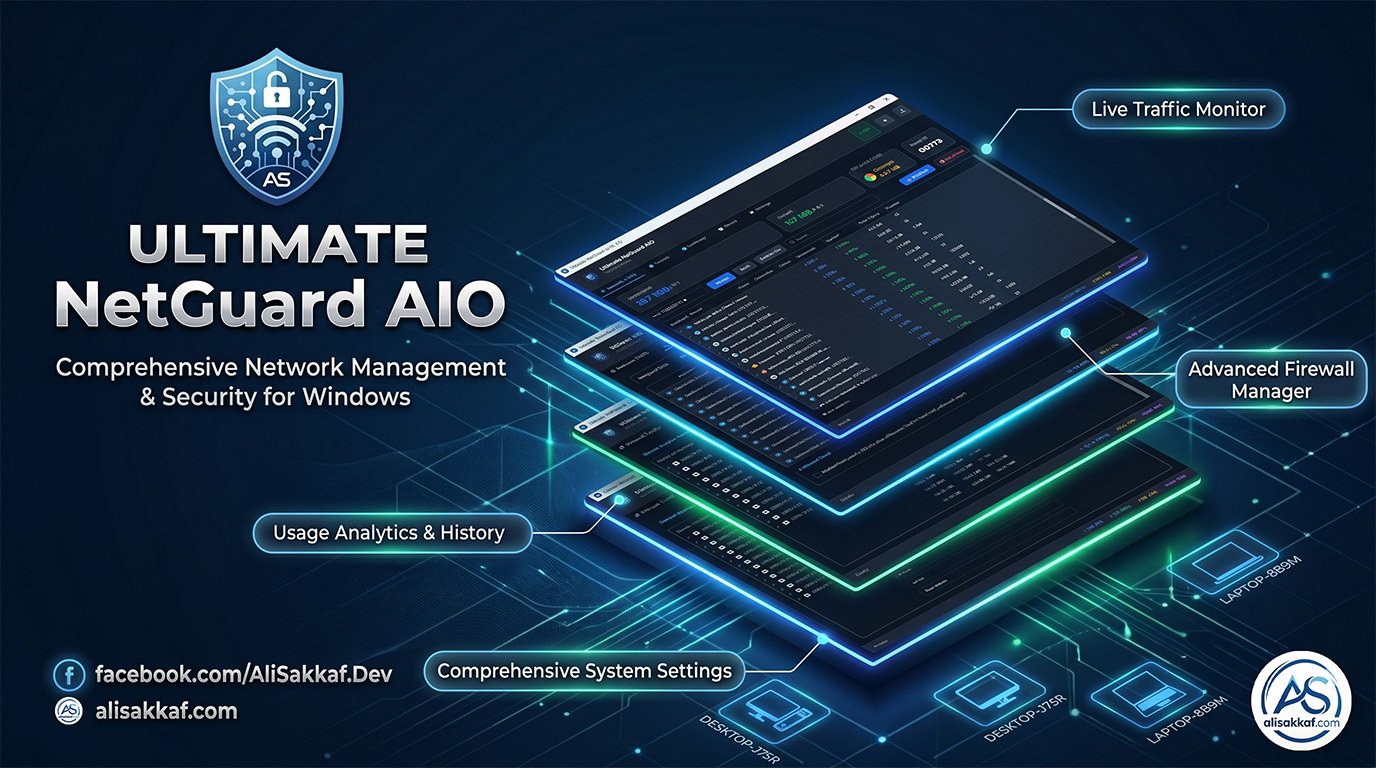

Ultimate NetGuard AIO
The Most Powerful Free Network & System Monitor for Windows
Version 1.1.0 | Open Source (MIT License) | Built Natively with C++ & Qt
🔍 Introduction: What is Ultimate NetGuard AIO?
Ultimate NetGuard AIO is a professional-grade, all-in-one network security suite built from the ground up for Windows 7 through Windows 11. It combines real-time packet-level traffic monitoring, Windows Firewall management via the COM API, hardware thermal/performance monitoring, persistent bandwidth history tracking, a transparent taskbar hardware dashboard, and an intelligent self-installer with OTA updating.
Unlike basic task managers or overwhelmingly complex packet sniffers like Wireshark, this tool strikes the perfect balance between deep technical transparency and beautiful user-readability. The engine ties live TCP/UDP connections directly to their originating executables, resolves process icons, and displays real-time download/upload speeds per application. You will always know exactly which program is consuming your internet bandwidth, where it connects, and how much data it transfers.
🚀 Deep Dive into Core Features
🌍 1. Real-Time Network Packet Engine
The heart of the application. It captures all network traffic using native Windows Raw Sockets (
SIO_RCVALL) bound to your active adapter — no WinPcap, no Npcap, no driver installation whatsoever. Every packet is parsed, matched to a running process via the Extended TCP/UDP tables, and displayed in a hierarchical tree view.- Raw IPv4/IPv6 Socket Capture.
- Per-Process Tracking & Live Speed Metering.
- Right-click any process to kill it, view its full properties dialog, or open its file location.

🛡️ 2. Windows Firewall Manager & Lockdown Mode
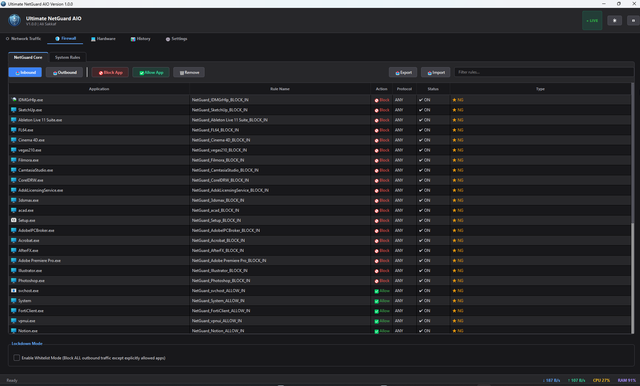
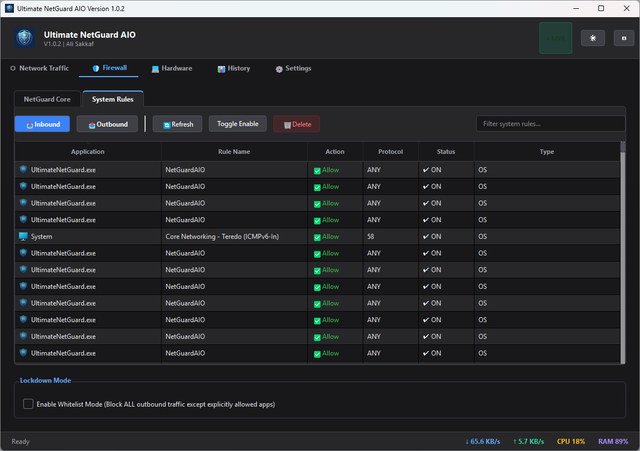
Direct integration with Windows Defender Firewall through the COM interface. Block or allow any application with a single click or drag-and-drop executables directly onto the firewall table.
Whitelist Lockdown Mode: The ultimate defense for untrusted networks. With one toggle, it blocks ALL inbound and outbound traffic across your entire OS, allowing only explicitly trusted apps to pierce the lockdown.
🔐 3. Pre-Built Firewall Rule Profiles (One-Click Import)
The application ships with 6 professionally curated JSON firewall profiles:
- 🏢 Global Workspace Shield: Allows major browsers, Zoom, cloud storage. Blocks background noise.
- 🚀 Ultimate Esports Nexus: Pro gamers profile. Prioritizes ultra-low ping. Allows Steam, Discord, OBS; blocks Windows updates.
- 💻 Master Developer Sandbox: Unrestricted for IDEs (VS Code, Qt), Docker, databases, and AI assistants.
- 🔒 ZeroTrust Privacy Citadel: Maximum anti-tracking. Allows only Tor, Brave, VPNs, and Signal.
- 📥 P2P Media Vanguard: Exclusively permits IDM, Torrents (qBittorrent), and media players.
- 🚫 Offline Isolation Blacklist: Forces Adobe, Autodesk, and Corel into permanent offline mode to preserve local licenses and block telemetry.
💻 4. Hardware & Thermal Monitor
Built-in hardware monitoring queries Microsoft's WMI and PDH libraries directly. Tracks real-time CPU utilization, RAM usage, Disk I/O, and GPU strain with beautiful circular gauge widgets that change color based on load thresholds.
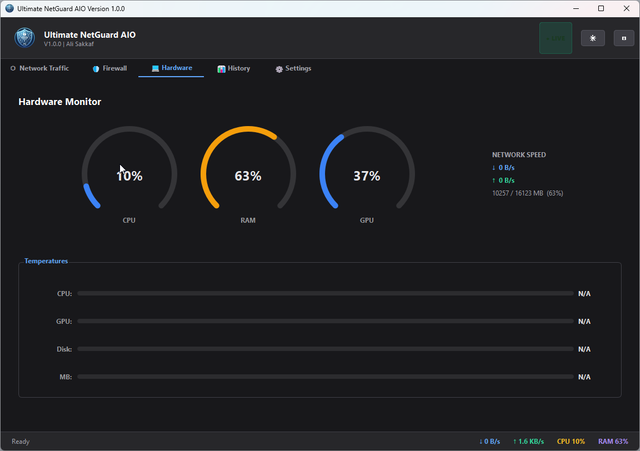
📊 5. Taskbar Overlay 2.0 & Bandwidth History
- Usage History: Records exact bytes downloaded/uploaded per app, day by day, in a persistent JSON database. Exportable to CSV.
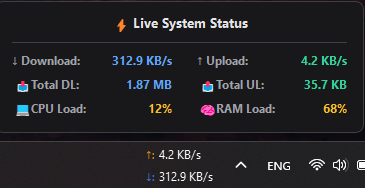
- Taskbar Hardware Dashboard: A sleek, frameless, transparent floating widget anchored directly into your Windows taskbar. Now shows live network speeds, CPU, RAM, GPU, and temperatures — all at a glance.

🆕 6. NEW in v1.1 — Taskbar Overlay 2.0: Real-Time Hardware Intelligence
The taskbar overlay has been completely rebuilt from the ground up in v1.1, transforming it from a simple speed indicator into a full hardware monitoring dashboard:
- 🖥️ CPU Monitoring: Real-time processor utilization percentage via Windows PDH counters.
- 🧠 RAM Monitoring: Live memory consumption with 3 configurable display formats — Percentage (%), Megabytes (MB), or Gigabytes (GB).
- 🎮 GPU Monitoring: Per-GPU engine load via WMI. Supports multi-GPU systems — choose which specific GPU to monitor (integrated or dedicated).
- 🌡️ Temperature Display: Combined CPU°/GPU° temperature reading (e.g., 72/65°) via ACPI thermal zones.
- 🔍 Multi-GPU Auto-Detection (DXGI): Automatically detects all installed GPUs by their real hardware name using DirectX DXGI enumeration (e.g., "NVIDIA GeForce RTX 3080", "Intel UHD Graphics 630").
- 🖱️ Drag & Drop Positioning: Left-click and drag the overlay to any position on the taskbar. Position persists across restarts, resolution changes, and DPI scaling.
- 💎 Text Shadows: All overlay labels have drop shadows for 100% legibility over any taskbar background.
- 📊 Enhanced Hover Popup: Hovering the overlay now shows 10 live metrics across 5 rows — including GPU load, RAM detail, and individual CPU/GPU temperatures.
⚙️ 7. Smart Self-Installer, Settings & Theme Engine
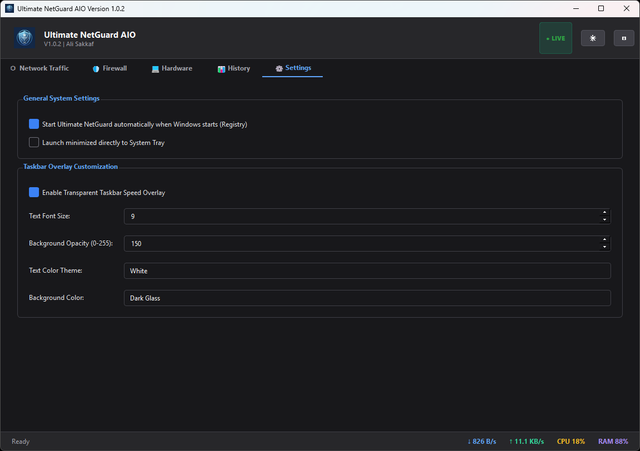
Switch instantly between a professionally designed Dark Theme and a clean Light Theme. On first launch, the app automatically elevates to Admin, copies itself to Program Files, creates shortcuts, and registers auto-startup.

📋 System Requirements
- OS: Windows 7 SP1, 8.1, 10, or 11 (x86 and x64)
- RAM Usage: Under 40 MB — extremely lightweight.
- Dependencies: None — fully standalone, portable executable.
- Permissions: Administrator (strictly required by Windows for raw sockets and firewall COM API).
📥 Download Links & Resources (100% Free & Open Source)
🔗 Official Website Article: Read Full Documentation Here
🔗 GitHub Repository (Source Code): Explore the C++ Code
📦 GitHub Releases (Download ZIP): Download Latest Version
⚡ Auto-Install / Direct Download:
Click here to download the latest executable directly
🛡️ Security, Privacy & VirusTotal
Privacy First: The application does NOT collect, transmit, or store any user data outside the local machine. It makes ZERO outbound network connections itself.
VirusTotal Scan:
🟢 Click here to view the 100% Clean VirusTotal Report
*Note: Because this tool modifies Windows Firewall rules, accesses process memory (to read names/icons), and uses raw sockets for packet sniffing, some over-sensitive AV engines might flag it as a generic risk (False Positive). This is normal for network administration tools. The software is open-source, and you are encouraged to compile it yourself from GitHub!*
Search Keywords / SEO Tags: Ultimate NetGuard AIO, best free network monitor for windows, open source bandwidth tracker, windows firewall manager alternative, glasswire free alternative, netlimiter alternative, raw sockets packet capture c++, taskbar internet speed meter widget, track application data usage windows 10 11, block program from internet windows firewall, wmi pdh hardware monitor, qt5 c++ network sniffer, taskbar cpu ram gpu temperature monitor, multi gpu dxgi detection, Ali Sakkaf software development.
© 2026 Ali Sakkaf. All Rights Reserved. Licensed under MIT.
If you find this tool useful, please drop a comment below or leave a ⭐ on the GitHub repo!
If you find this tool useful, please drop a comment below or leave a ⭐ on the GitHub repo!