
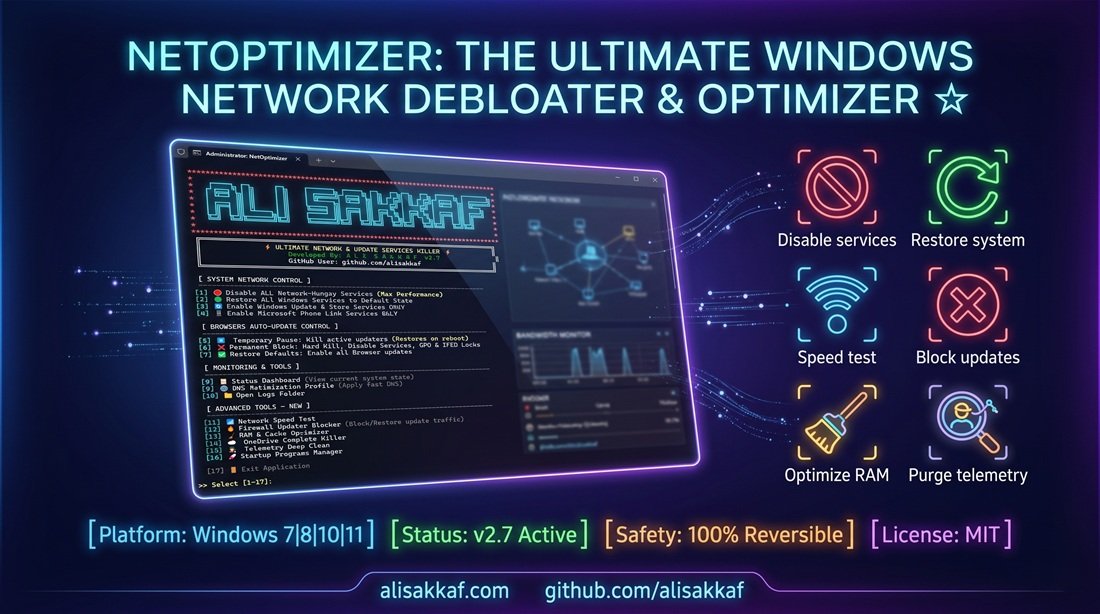
Welcome to NetOptimizer Pro: The Ultimate Windows Network & System Debloater
Are you tired of unexpected ping spikes while gaming? Is your limited data plan being drained by hidden background services? NetOptimizer Pro is a highly aggressive, meticulously engineered Windows optimization utility designed to give you 100% absolute control over your machine's network bandwidth and hardware resources.
Modern Windows operating systems and web browsers are notorious for consuming massive amounts of background data for silent telemetry uploads, mandatory software updates, and background cloud synchronization. For competitive gamers who require stable latency, or users on metered connections and mobile hotspots, this background data bleed is unacceptable. NetOptimizer Pro halts this leakage instantly using the advanced ZeroLeak Protocol.
Why Traditional Debloaters Fail (And Why NetOptimizer is Safe)
Most traditional "Windows Debloaters" recklessly delete core system files, force-uninstall essential system apps, and permanently corrupt the Windows Registry. This destructive approach often leads to a broken operating system, boot loops, or security vulnerabilities that eventually require a full OS reinstall. NetOptimizer Pro takes a vastly superior, 100% Non-Destructive Approach.
This script never deletes system files, services, or registry keys. Instead, it operates exclusively by suspending active RAM processes, altering startup configurations, disabling unnecessary background tasks, and applying stringent Local Group Policy (GPO) blocks. If you ever need to restore your system, every single action performed by NetOptimizer Pro is completely reversible with a single click inside the program.
Complete Feature Deep-Dive
1. Windows System Network Control (Core Performance)
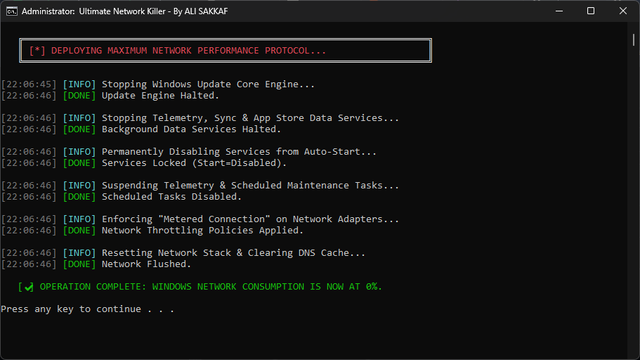
Take charge of the core Windows operating system services that silently drain your bandwidth and cycle your CPU in the background.
- Extreme Telemetry & Analytics Purge: Force-kills Microsoft's heaviest data collectors (such as
CompatTelRunner.exeandDeviceCensus.exe), halts the Diagnostics Tracking service (DiagTrack), and suspends Windows Error Reporting (WerSvc) to stop massive automated crash-dump uploads. - Background UI & Sync Termination: Instantly kills memory-resident background processes like
msedgewebview2.exe(which drives Windows 11 widgets and news feeds) and stops OneDrive from syncing or pinging Microsoft servers. - Chrome & Edge Scanner Blocks: Terminates background tools like Google Chrome's
software_reporter_tool.exe, which silently scans your local hard drives and consumes CPU resources and network bandwidth. - Core Update Engines Suspended: Safely halts the Windows Update service (
wuauserv), Background Intelligent Transfer Service (bits), and Update Orchestrator (UsoSvc) to ensure no surprise downloads occur while you are online. - Gaming & Superfetch Control: Halts Xbox background syncing and disables
SysMain(formerly Superfetch) to prevent predictive network and disk spikes during competitive gaming. - Automatic Metered Connection: Injects registry keys that force Windows to treat both Wi-Fi and Ethernet connections as "Metered", preventing automatic updates from ever downloading in the background.
2. Smart System Restoration & Enablers
Because the tool is non-destructive, you have granular control to bring back specific services when you actually need them, without re-exposing your PC to bloatware.
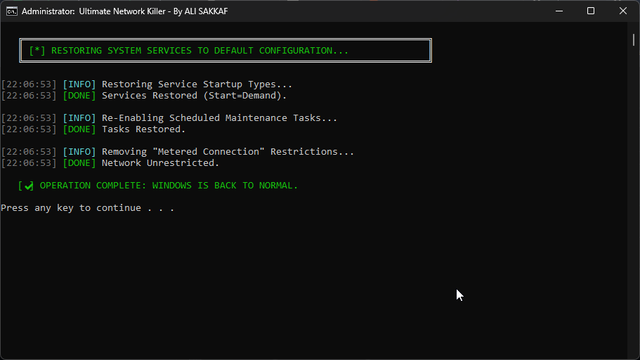
- 1-Click Total Restore: Reverts all 20+ disabled services, scheduled tasks, and telemetry agents back to their native, factory default states.
- Windows Update & Store Unlocker: Reactivates only the specific engines needed to download Windows Updates and use the Microsoft Store (such as
ClipSVCandAppXSVC), without waking up the tracking and telemetry agents. - Microsoft Phone Link Restorer: Exclusively reactivates the essential services for Microsoft Phone Link to sync messages and photos seamlessly, keeping the rest of the system bloatware safely locked down.
3. The Ultimate Browser Auto-Update Controller
Modern browsers like Google Chrome, Microsoft Edge, and Brave are notorious for ignoring standard service blocks, utilizing hidden crash handlers, scheduled tasks, and remoting tools to force automatic updates and consume system resources.
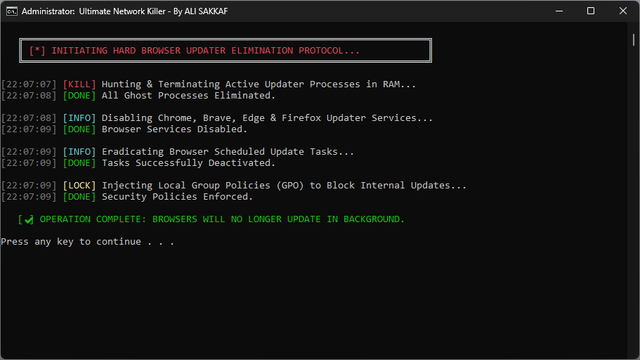
- Temporary Pause: Instantly frees up RAM by terminating over 30 hidden browser processes for the current session only. Everything returns to normal automatically upon a reboot.
- Permanent Block with IFEO Debugger Traps: Hard-kills active updater processes and injects Image File Execution Options (IFEO) Debugger Traps alongside GPO rules. This makes it mathematically impossible for browser updaters to execute, fully securing your system's network bandwidth.
- Restore Defaults: Cleanly removes all IFEO traps and GPO policies, allowing your browsers to update normally again.

4. Comprehensive Real-Time Status Dashboard
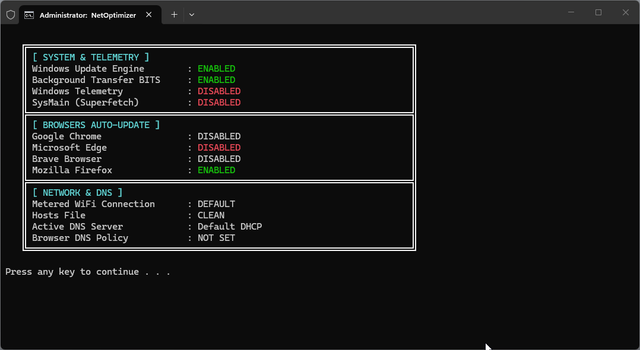
Stop guessing what is running in the background. NetOptimizer Pro provides a highly detailed, at-a-glance system status panel that instantly reads and displays the live state of all critical Windows components, browser update policies, and DNS configurations without ever needing to open the complex services.msc window.
5. Advanced DNS Optimization Center
The built-in DNS manager is a professional hub designed to reduce latency, bypass geographic restrictions, and protect your privacy.
- Live Ping Check: Automatically pings 9 premium DNS providers (including Cloudflare, Google, Quad9, AdGuard, ControlD, Shecan, and Electro) and displays their real-time ping latency before you even choose a provider.
- Browser DoH Enforcement: Forces your browsers to use the selected DNS securely via DNS-over-HTTPS (DoH) registry policies, securing your browsing queries from ISP tracking.
- Custom DNS & DHCP Reset: Enter your own custom DNS, or fully reset everything back to automatic DHCP with one click.
The Suite of Advanced Optimization Tools
NetOptimizer Pro packs an elite suite of advanced utilities to push your system performance to the absolute limit.
- Firewall Updater Blocker: Injects strict outbound Windows Firewall rules to cut off update executables (like
wuauclt.exe,WaaSMedicAgent.exe,GoogleUpdate.exe,MicrosoftEdgeUpdate.exe, etc.) at the network level, providing an impenetrable secondary layer of defense. - OneDrive Complete Killer: Force-terminates OneDrive, removes it from all startup registry keys (HKCU & HKLM), and applies GPO blocks to disable file sync. It completely neutralizes OneDrive without deleting any of your personal files.
- Telemetry Deep Clean: A surgical, registry-level protocol that sets
AllowTelemetryto 0, disables the Windows Advertising ID, and nullroutes 10 known Microsoft telemetry domains directly in your system's HOSTS file (such asvortex.data.microsoft.com,watson.telemetry.microsoft.com, etc.). - Startup Programs Manager: Provides a comprehensive audit of all startup entries across HKLM/HKCU run keys and the Startup Folder, allowing you to quickly type the name of any entry to disable it permanently and speed up your PC boot time.
- Network Speed Test: A built-in PowerShell tool that downloads a 2 MB test file from Cloudflare, calculating your exact real-world download speed in Mbps and average ping latency.
RAM & Cache Optimizer - In-Depth Performance Guide
RAM management on Windows is notoriously inefficient. Over time, background processes and Windows itself accumulate heavy cached memory pages, standby lists, and temporary data. While Windows marks this as "free", it actually delays access times and causes sudden micro-stutters and frame drops during high-end gaming or resource-heavy applications.
The **RAM & Cache Optimizer** service inside NetOptimizer Pro utilizes a multi-step, surgical memory reclamation protocol that works instantly:
- Advanced Memory Trimming: Uses native Windows APIs via PowerShell to force active processes consuming more than 50 MB of RAM to trim their working sets, releasing idle memory back into the system's pool.
- Standby List Flush: Empties the Windows standby memory list, converting inactive cache pages into active free RAM.
- DNS Resolver Cache Flush: Fully clears your local DNS resolver cache (
ipconfig /flushdns) to resolve domain conflicts and ensure your connection uses the optimized DNS pathways instantly. - Clipboard Purge: Wipes the system clipboard to free up resources held by large copied objects.
- Temp File & Log Purge: Scrapes the user's
%TEMP%folder, instantly deleting junk temporary files and system log logs that accumulate disk writes and slow down I/O operations.
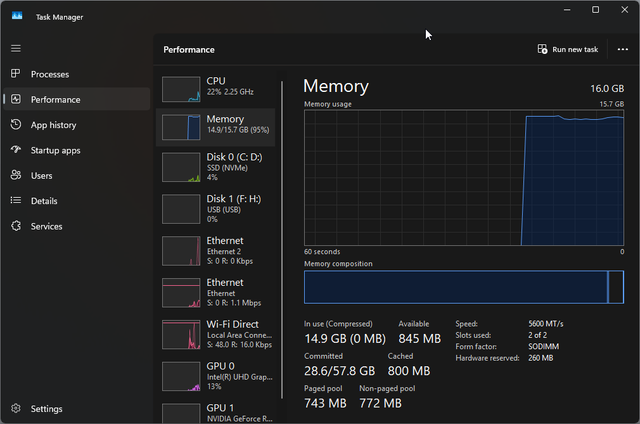
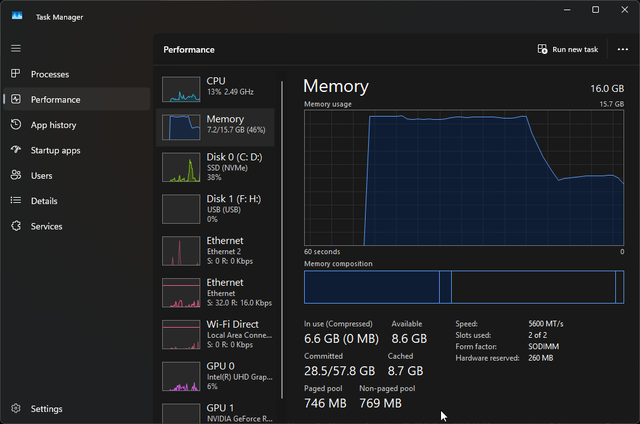
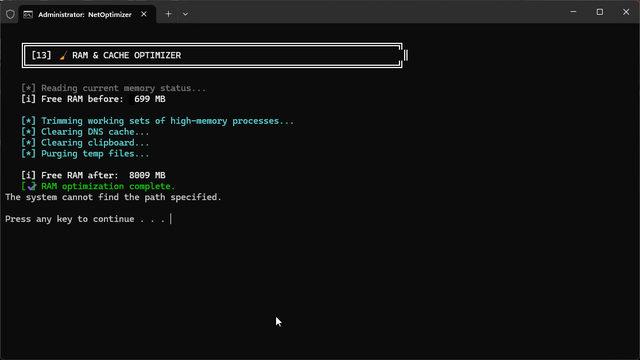
This service displays the exact amount of **Free RAM before and after** the optimization, allowing you to see the real-world efficiency of the memory reclamation process.
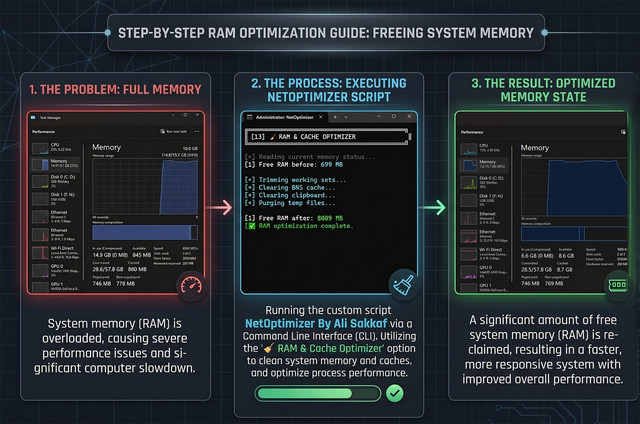
RAM Optimizer in Action
Witness the true power of the NetOptimizer RAM & Cache engine. Reclaim gigabytes of wasted memory in seconds and enjoy stutter-free performance!
| 🔴 Before Optimization | 🟢 After Optimization |
|---|---|
 |
 |
| ⚡ Interactive CLI | 📖 Smart Guide |
 |
 |
Pro Edition vs. Lite Edition
To ensure 100% compatibility across all Windows environments, NetOptimizer is distributed in two distinct versions that share the exact same optimization engines:
- NetOptimizer Pro: Tailored for modern desktop environments (Windows 10 and Windows 11). It features dynamic ANSI colors, responsive emojis, and a beautiful UTF-8 interactive interface.
- NetOptimizer Lite: Engineered for legacy operating systems (Windows 7, Windows 8, and legacy Windows 10 builds) and enterprise servers. It runs in standard ASCII text and native CMD encoding to ensure a bulletproof execution with zero dependencies or GUI crashes on older architecture.
How to Use NetOptimizer Pro
- Navigate to the official download link and grab the latest
.batfile (Pro or Lite) suitable for your system. - Right-click the downloaded file and select "Run as Administrator". *(The script automatically verifies administrative privileges, but manual elevation is best practice).*
- Wait for the self-healing auto-updater engine to check for the latest script patches (takes less than 5 seconds).
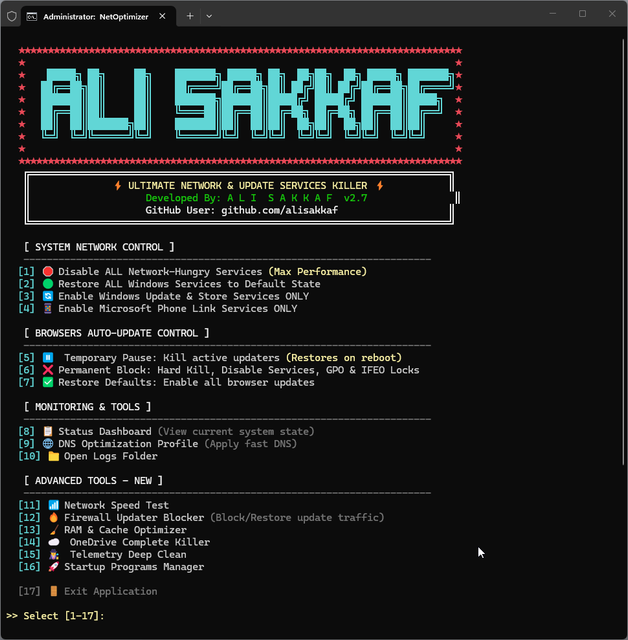
- Once the interactive menu appears, select your desired optimization protocol by typing the corresponding number
[1-17]and pressing Enter. - Watch the real-time command console log and execute the safe system changes. Wait for the green
[✔] OPERATION COMPLETEmessage. - Restart your PC to allow all Registry, Group Policy, and HOSTS modifications to propagate completely.
Strict Disclaimer & System Safety
Use at your own risk. NetOptimizer Pro is a powerful system administration utility. Disabling Windows Updates permanently prevents your system from receiving critical security patches, leaving your system vulnerable to zero-day exploits. It is highly recommended to periodically use the **[2] Restore** or **[3] Enable Windows Update ONLY** option to update your system securely, let it finish, and then deploy the optimization protocols again. The developer is not responsible for any system instability or issues that may occur from the misuse of this tool.